
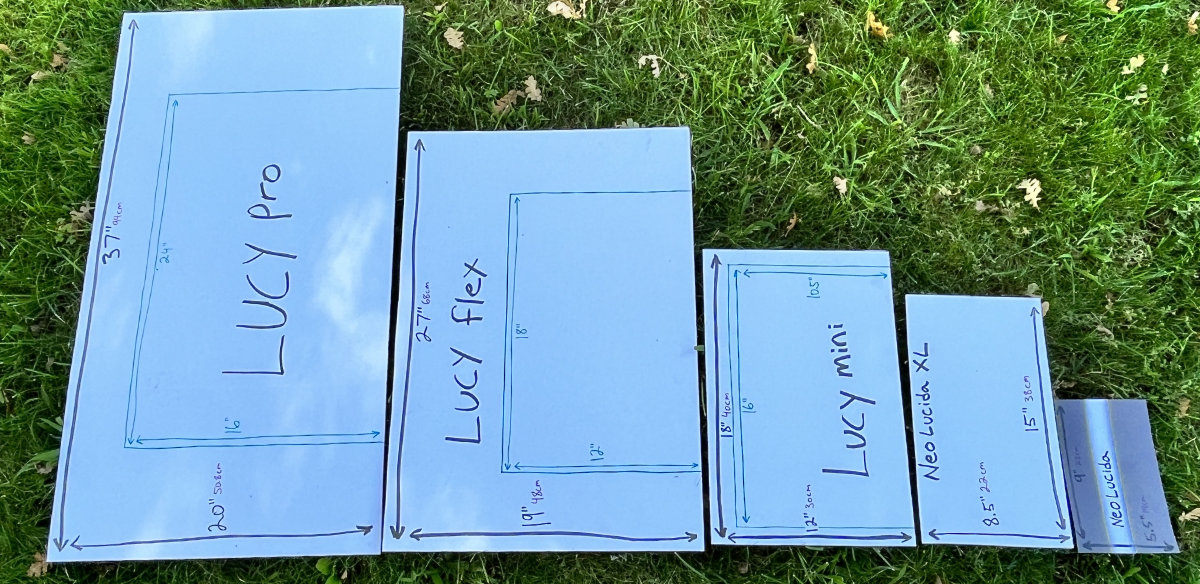
When I first started building camera lucidas in my garage back in 2005, the landscape was pretty barren. The only competition was another garage innovator and a UK-based company, both of which have since vanished. My mission has always been to build the best drawing tool possible, inspired by the time-tested technologies of the old masters. Today, as DrawLUCY has become a global name, it's worth pausing to compare it with other modern camera lucidas that have popped up since we started.
A Reluctant Critique
Initially, I was reluctant to release a blog post like this. I respect anyone’s effort to innovate in a field I’m passionate about. Take NEOLUCIDA, for example. Their initial product was essentially a “prism on a stick.” It was affordable, even if not very effective. Post-Kickstarter, they outsourced to China and rolled out NEOLUCIDA XL, which appeared to mimic our LUCY flex.
And NEOLUCIDA's problems are unfortunately getting worse rather than better with the launch of the NEOLUCIDA PLUS. The NEOLUCIDA PLUS is a redesign of the original NEOLUCIDA that adds features addressing non-issues, while maintaining the tiny difficult-to-use image, at now an even more inflated price than before.
These moves, especially the inflated prices, prompted me to speak out to prevent people from getting fooled into buying inferior products.
Side By Side Comparison
Here are 3 graphics comparing our three LUCY models to the three NEOLUCIDAs. I tried to match them up the best I could on price, but the LUCY pro is so far and above anything else and the NEOLUCIDA Plus is so overpriced for what it is that comparing those two doesn’t really make sense, but I had to match them up somehow.


In terms of size and other factors highlighted in the video, the LUCY pro is unparalleled. Cheaper might be okay if you're getting what you pay for, but be cautious of inferior products priced as if they're comparable. The NEOLUCIDA XL tries to position itself alongside the LUCY flex but falls way short. Even our smallest, most affordable model, the LUCY mini, outperforms all three NEOLUCIDAs, while costing less.
Additional Advantages
DrawLUCY models are not only built in the USA with top-quality materials but also feature smart, well-thought-out designs. Each model offers adjustable brightness through optical filters: LUCY flex and LUCY pro have two filters for four levels, while LUCY mini has one for two levels. Plus, DrawLUCY devices use high-quality half-silvered mirrors for brighter images. As a bonus, the entire DrawLUCY line is compatible with the Photo Enlarger accessory, opening up a whole new world of creative possibilities.
Design Flaws
Besides its small image, inflated price, and being made with cheap plastic, the NEOLUCIDA XL has a major design flaw: its open sides allow light to interfere with the image as you're drawing. Additionally, if you try to remove the filter to use it, the head falls apart. It also retains the same small, flimsy arm and clamp as the original NEOLUCIDA, which can't adequately support the larger head.
The original NEOLUCIDA uses a historical prism design, but these prisms are difficult to use and the images hard to see, making it tough to draw from. Years ago, when I was experimenting in my garage, I found these prisms performed so poorly that I chose not to include them in my devices. Opting for a "prism on a stick" would have been cheaper, but that was a compromise I wasn't willing to make.
The new NEOLUCIDA Plus has a new prism with a slightly larger image compared to the original, but keeps all the difficulties of the original. They basically tweaked the design of the original, then doubled the price and added the word 'Plus', which I can only assume is referring to the price.
Final Thoughts
In closing, I really do appreciate everyone's attempts at inventing or reinventing something. Everyone has something valuable to contribute. The only reason I've taken a more critical tone is that there's a line of camera lucidas positioning themselves as comparable to the DrawLUCY line when they clearly are not, and I don't think that's honest. NEOLUCIDA isn't transparent about the shortcomings of their devices; they don't even list the image size on their website and some of the videos they have put out on the image size of their tools are laughably misleading. So I picked up my camera to show everything side-by-side, aiming to give people the info they need to make the best choice for creating art with a tool rooted in the techniques of the old masters.
What do you think? We would love to hear from anyone who has used both the LUCY and the NEOLUCIDA. Please tell us what you think in the comment section below.
Learn more about DrawLUCY camera lucidas HERE.


17 comments
Thomas Bricker
I have tried 3 different versions of the current Camera Lucida devices on the market.
I prefer this one for many reasons.
I find the Lucy Flex to be the easiest and most effective to use.
It’s the most robustly built and flexible in its different use case scenarios.
You can use this tool with the viewing hole pointing upwards or pointing straight towards you. I find the forward facing configuration to be the most comfortable.
(You can’t do this forward facing configuration on the NeoLucida Plus. On that device, you must constantly looks down. I quickly found this to be very uncomfortable. Makes your neck and shoulders ache.) I do not have that problem with the Lucy Flex.
The Flex gives you a complete view of your subject. The image is clear and transparent. The other devices I tried only give you a narrow horizontal sliver of the image at a time. You have to crane your neck back-and-forth to see your entire subject. (not great).
The Flex uses glass mirrored surfaces to show you your image. It works well.
It also comes with two ND filters that allow you to fine tune the brightness of the projected image. Quite helpful.
The version of the Lucy Flex that I bought also includes the photo enlarger attachment and a carrying bag. The enlarger tool allows you to attach a 4 × 6 photo print to an armateur and then trace the photo onto your page. It’s fun to do and it works well.
The clamp mechanism and gooseneck arm on the Flex is robust and strong. It’s very adjustable.
Now, when it comes to actually using the Lucy Flex, what’s cool is the way your eye and your brain coordinate with your fingers. The image and your drawing go in and out of focus and trade off to allow you to put your drawing down on the paper. It’s difficult to describe, but your awareness of one or the other goes in and out. It’s fascinating. I manage to do it sometimes with both eyes open relying on my right eye and my brain to guide my hand. It’s very cool.
I highly recommend this device. It is a great non-diigital way to create art with proportional accuracy.
Give it a try!
Thomas Bricker
I’m relatively new to using the Camera Lucida. After watching way too many YouTube videos and pouring over the existing information about Lucy Flex and NeoLucida. I opted for the Lucy flex.
I initially tried it with the eye opening on top. Didn’t love that option because of the way my light source was reflecting into my eye off of the mirror. Then I tried it where the eye-opening is facing towards me, and I much prefer it. Once you get the hang of it you can use it this way with both eyes open and it is much less fatiguing. Your brain has to get used to what it is seeing. It’s very cool that you can look at something in 3-D and with practice, draw its shape underneath the image that you see. Your mind needs to trust where the tip of the pencil is going. There’s an almost zen like quality to the process. Since the eye-opening is large in the Lucy flex, you can even back off from the headpiece and still see what you’re doing clearly. Very cool. I tried out a much cheaper version that appears to be a budget copy of NeoLucida‘s XL model. It is really subpar. It doesn’t stay together well, and the reflective material gives you a dull and indecipherable image compared to the Lucy flex.
I also love the extensibility of Lucy flex. It’s just a better system overall.
I do plan to try out the NeoLucida plus just to see how it compares, but I don’t anticipate I will like it because it uses a looking down configuration and the extension harm is very short. Call me crazy, but I like to be comfortable when I’m drawing. 😊
Hats off to you for producing a quality product and then hustling so much to let the world know about it. I know this has been a lot of work. So thanks for doing it! 👍🏻
Josephine
Estelle Swanepoel, The LUCY Flex can project images up to 19 x 27 inches, and the LUCY Pro can project images up to 20 inches high by 37 inches wide, so both models can comfortably handle A2 size artwork. To better address your specific needs, I would need to know more about what you'll be drawing from. Are you drawing from life or from photos? Is it a landscape or a portrait? All three of our LUCY models provide the same high-quality image, but the two mentioned above come equipped with two filters and four brightness levels to help you achieve a brighter, clearer image. We are here to help both before and after your purchase, whether you need customer service or parts. You can contact us at ContactDrawLUCY.com or call us at 1-888-958-2432.
Estelle Swanepoel
Hi
Please let me know which Lucy enlarges to A2 size paper or bigger. Also high quality images. Where do I get after sales service and parts from?
Tx
Josephine
@ Aj Khonde, La LUCY la plus grande est la LUCY Pro, mais sa taille d’image est de 94 cm de large sur 51 cm de haut, ce qui est légèrement plus petit que la toile dont vous parlez.
Leave a comment
All comments are moderated before being published.
This site is protected by hCaptcha and the hCaptcha Privacy Policy and Terms of Service apply.